
TL;DR
A CVV is the 3 or 4-digit security code on your credit or debit card, separate from the main card number. It exists for one reason: to prove you physically have the card when you’re paying for something online or over the phone.
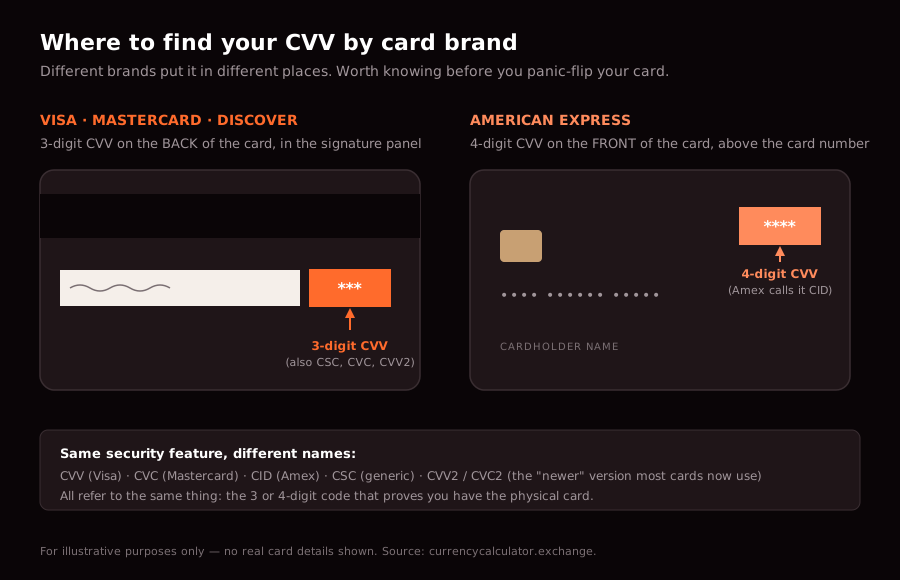
On Visa, Mastercard, and Discover cards, the CVV is 3 digits, printed on the back in the signature panel. On American Express cards, it’s 4 digits, printed on the front above the card number. Different brands call it different things — CVC, CID, CSC — but it’s the same idea.
You should give your CVV to legitimate merchants when you’re paying for things. You should never give it to anyone who calls or emails asking for it, never type it into a site you don’t trust, and never store it in writing anywhere a stranger could find it. That covers about 95% of what most people need to know. The rest of this guide covers the other 5% — including the international payment angle that the bank-published guides don’t.
What does CVV stand for?
CVV = Card Verification Value. It’s the formal name Visa uses. Mastercard calls it CVC (Card Validation Code). American Express calls it CID (Card Identification). Discover uses CID too. Generically, the industry term is CSC (Card Security Code). And the version printed on the card you’re currently holding is almost certainly CVV2 — the second-generation version, calculated using a more secure algorithm than the original CVV1.
All of these refer to the same thing: a short numeric code, separate from your card number, that’s meant to prove the card is in your possession.
For the rest of this guide, “CVV” means whichever of these your card uses.
Where is the CVV on your card?
Two layouts to know:
Visa, Mastercard, Discover: 3-digit code on the back of the card, printed in the signature panel just to the right of the card number.
American Express: 4-digit code on the front of the card, printed above and to the right of the main card number.
That difference catches people out. If you’re used to Visa or Mastercard and you pick up an Amex card, you’ll flip it over and find no CVV on the back — because Amex puts it on the front.
Newer contactless and chip cards may also generate a dynamic CVV electronically — a code that changes regularly, never the same twice. You won’t see it printed on the card; it’s only used in specific transaction types. Most cards in circulation still use the static printed CVV.
What does the CVV actually do?
The CVV proves that you have the physical card in your possession at the moment you’re paying.
That’s the whole job.
Here’s why it matters. Your card number, your name, and your expiration date can all be read off your card by anyone who sees it — or stolen from a database breach. Lots of fraud comes from card numbers that were leaked, copied, or skimmed. The CVV is supposed to be the bit that can’t be easily lifted.
Crucially, merchants are not allowed to store your CVV after authorising a transaction. PCI DSS (the Payment Card Industry Data Security Standard) explicitly prohibits storing the CVV in any database. So if a website’s customer database gets breached, the breach gives away card numbers — but should not give away CVVs. That’s why a stolen card number alone is less useful than the full card details to a fraudster, and why you’ll often be asked for the CVV even when a site already has your card “saved.”
When this works:
- Online checkout asks for your CVV — protects against someone using a card number that leaked in a data breach
- Phone payment asks you to read out the CVV — protects against someone who took a photo of your card without seeing the back
- New shipping address triggers a CVV re-entry on a saved card — extra confirmation it’s really you
When this doesn’t help:
- You hand your physical card to a waiter, who photographs both sides
- You enter the CVV on a phishing site you thought was your bank
- You give the CVV to someone claiming to be your bank on the phone
The CVV is one layer of protection, not a complete one. It’s vital for card-not-present transactions (online, phone, mail order) and almost entirely irrelevant for card-present transactions where you swipe, tap, or insert the chip.
CVV1 vs CVV2: the two codes you don’t see
Most cards have two CVVs.
CVV1 is the code embedded in the magnetic stripe on the back. You never see it directly. When you swipe your card at a point-of-sale terminal, the terminal reads CVV1 and sends it to the issuer to verify the card is genuine. CVV1 is what makes magnetic-stripe transactions secure (relatively) against someone who has only your card number.
CVV2 is the one printed on the card — the 3 or 4-digit code we’ve been talking about. Different from CVV1, used only for card-not-present transactions.
When someone says “CVV,” they almost always mean CVV2.
A third version, CVV3 or dynamic CVV, is generated on the fly by chip cards or by mobile wallets like Apple Pay and Google Pay. Each transaction uses a different code, which is why mobile-wallet payments are more secure than typing your card details into a website — even if intercepted, the code can’t be reused.
When should you share your CVV?
Three legitimate situations:
1. Online checkout with a merchant you trust. Amazon, your supermarket, an airline you’re booking with, a SaaS subscription — the CVV field is a normal part of the checkout flow. Type it in.
2. Over the phone with a merchant. Booking a hotel directly, paying a restaurant bill remotely, ordering takeaway in some regions. The merchant will ask for the card number, expiry, and CVV in a single call. If the call was you who initiated it (you called them), this is generally fine.
3. A trusted recurring biller asking for re-verification. Your gym, your phone provider, your subscription service occasionally asks you to re-enter card details after a security event. This is normal.
That’s the whole list.
When should you absolutely NOT share your CVV?
This is the section the bank pages bury. It matters more than the other stuff.
Never share your CVV with anyone who calls or emails you. No legitimate organisation — not your bank, not the police, not HMRC, not your card issuer, not anyone — will call you and ask for your CVV. Your bank in particular already has it. They issued the card. They will never ask you to “confirm” the CVV by reading it out.
Never enter your CVV on a site you don’t recognise. Lookalike sites copy real ones convincingly. Check the URL carefully. Look for https:// and the padlock icon. If you arrived via an email link, don’t trust it — open a new tab and navigate to the site directly.
Never write your CVV down somewhere a stranger could find it. Don’t tape it to the card itself, don’t save it in a plain-text note on your phone, don’t email it to yourself. Use a password manager if you genuinely need to store it.
Never give your CVV to a stranger asking for it in person. This sounds obvious, but social engineering attacks (“I’m calling from your bank’s fraud department, please confirm your card details”) are common and effective.
Be cautious with QR codes. Phishers use QR codes to send victims to fake payment pages. If a QR code takes you to a payment page asking for your card details and CVV, treat it with the same suspicion you’d give an email link.
What happens when you pay in a foreign currency?
When you use your card abroad or pay an international merchant, the CVV does the same job — proves you have the card — but the transaction picks up a few extra layers:
FX conversion. The merchant prices something in their currency (say, euros). Your card issuer converts that euro amount into your home currency (say, pounds) at their internal FX rate, which is usually 1–3% above the mid-market rate. The CVV plays no role in this conversion — it’s just card security.
Dynamic currency conversion (DCC). Some international merchants offer to charge you in your home currency instead of theirs. This sounds helpful but is almost always more expensive — DCC providers stack their own FX margin on top of whatever your card would have charged. Always pay in the local currency at the terminal. The CVV is required either way; it doesn’t affect the FX you pay.
3D Secure / Verified by Visa / Mastercard SecureCode. Many international online merchants now require an additional verification step on top of the CVV — usually a one-time code from your bank’s app or SMS. The CVV alone is sometimes not enough. This is a good thing; it stops a leaked card number plus a CVV from being enough to commit fraud.
If you want to know what FX rate your card is actually charging you, compare against the mid-market rate before and after the transaction. The difference between the mid-market rate and what your card statement shows is your provider’s FX margin — and it’s usually a bigger number than people expect.
Common CVV scams and how to spot them
A few patterns worth recognising:
The “fraud department” call. Someone calls claiming to be from your bank’s fraud team. They say there’s been suspicious activity and they need to verify your card. They ask for the full card number, expiry, and CVV. This is always a scam. Hang up and call the number on the back of your card.
The fake checkout page. You click a link in an email or social media post and land on what looks like a legitimate online store. The prices are too good to be true. You enter your card details, including CVV. The site collects them and disappears. Defend against this by typing site URLs into your browser directly instead of clicking links.
The “refund” scam. Someone calls or emails saying you’re owed a refund and they need your card details — including CVV — to process it. Refunds don’t work this way. A legitimate refund goes back to the card it was paid from, automatically. No new card details are required.
The QR code phisher. A QR code on a poster or in a “parking ticket” sends you to a fake payment page. The page captures your card details and CVV. If a payment page looks rushed, branded oddly, or asks for unusual information, abandon it.
In all of these, the giveaway is the same: someone is asking you for your CVV when they have no legitimate reason to.
FAQs
What is a CVV number?
A CVV (Card Verification Value) is a 3 or 4-digit security code on your credit or debit card, separate from the main card number. Its purpose is to prove you have the physical card in hand when you pay online or over the phone. On Visa, Mastercard, and Discover cards, it’s 3 digits on the back. On American Express cards, it’s 4 digits on the front.
Where is the CVV on a debit card?
Same place as on a credit card. For Visa, Mastercard, and Discover debit cards, the CVV is the 3-digit code on the back, in the signature panel to the right of the card number. For American Express debit cards (rare but they exist), it’s the 4-digit code on the front above the card number.
Is the CVV the same as the PIN?
No, completely different. The CVV is a 3 or 4-digit number printed on the card itself, used for online and phone payments. The PIN is a 4–6 digit code you choose, never printed on the card, used at ATMs and for chip-and-PIN purchases in person. You should never enter your PIN when asked for your CVV, or share your PIN with anyone.
Why does Amex put the CVV on the front of the card?
Historical convention. When American Express introduced its card security code in 1999, they put it on the front and made it 4 digits — different from the 3-digit format that Visa and Mastercard adopted on the back. They also call it “CID” (Card Identification Number) rather than CVV. Functionally it does the same job; Amex just chose a different layout.
Can a merchant store my CVV?
No. PCI DSS rules — the security standard that all card processors must follow — explicitly prohibit storing the CVV after a transaction is authorised. That’s why even merchants who “save” your card for future purchases will sometimes ask you to re-enter the CVV. They can save the card number and expiry; they cannot save the CVV.
What should I do if my CVV is compromised?
Contact your card issuer immediately and ask them to cancel the card and issue a replacement. The replacement card will have a new number, new expiry, and crucially a new CVV. You should also review recent transactions for anything unfamiliar and report any you don’t recognise as fraudulent. Most card issuers have 24-hour fraud lines printed on the back of the card.
Does a CVV protect me from all card fraud?
No. The CVV protects against one specific type of fraud: someone using your card number without having the physical card. It doesn’t protect against phishing (where you’re tricked into giving away the CVV), card-skimming (where the magnetic stripe is copied), or theft of the physical card. It’s one layer of defence, not a complete solution. Two-factor authentication (3D Secure, Verified by Visa) adds another layer on top.
Can I find my CVV without the card?
Not easily, and that’s by design. The whole point of the CVV is that it’s only available to someone holding the card. Your bank doesn’t display it in your online banking. Most card issuers won’t tell you over the phone either. If you’ve lost your card or can’t access it, the best option is to request a replacement — which will have a fresh CVV anyway. Some banking apps now display a virtual card with its own CVV; if your bank offers this, that’s the easiest workaround.
Why does the CVV change when I get a new card?
Because the CVV is mathematically derived from your card number and expiry date using a secret key only your card issuer knows. When any of those inputs change — new card number, new expiry — the CVV recalculates to a new value. This is what makes a leaked CVV less catastrophic than it sounds: replace the card, and the old CVV is permanently dead.
Do mobile wallets like Apple Pay use a CVV?
Not the one printed on your card. Apple Pay, Google Pay, and Samsung Wallet use a system called tokenisation — your real card number is replaced with a unique digital token, and each transaction generates a dynamic security code that’s used in place of the static CVV. This is more secure than typing your card details into a website, because even if the transaction is intercepted, the token and code can’t be reused.
The bottom line
The CVV is a small piece of plastic-and-printing that does a specific job: it stops someone who has only your card number from being able to use it online. It’s effective enough that every major card network requires it. It’s also not perfect — phishing, social engineering, and physical theft all bypass it.
Two practical takeaways:
- Treat your CVV like a password. Don’t share it with anyone who doesn’t have a legitimate reason to ask, and never store it somewhere a stranger could read it.
- If you do international transactions, the CVV is only half the story. The other half is the FX rate your card uses. The CVV protects you against fraud; it doesn’t protect you against the 1–3% your card issuer adds on every foreign transaction.
Check the mid-market rate before any international card payment to see exactly what your card is charging you on top of the real exchange rate. That’s the gap that genuinely costs people money, and unlike fraud, it’s not refundable.
For card-specific questions about CVV location, fraud reporting, or replacement, always contact your card issuer directly using the number on the back of your card. Never use contact details provided in an unsolicited email or call.
Sources:
- PCI Security Standards Council — PCI DSS requirements on CVV storage
- Visa, Mastercard, American Express, Discover — official card layout specifications
- Bank for International Settlements — card-not-present transaction frameworks
- UK Finance — payment fraud trends and reporting guidance